Suno.ing Editorial · संपादकीय टीम
Suno AI संगीत: विचार से रिलीज़ तक — 6-चरण क्रिएटर वर्कफ़्लो
Suno prompt योजना, Custom Mode, Extend, Suno Studio और मल्टी-प्लेटफ़ॉर्म प्रकाशन — तैयार ट्रैक शिप करने वाले indie creators के लिए दोहराने योग्य Suno AI संगीत वर्कफ़्लो।
इस पृष्ठ में उत्पाद या एफिलिएट लिंक हो सकते हैं। एफिलिएट प्रकटीकरण · संपादकीय नीति
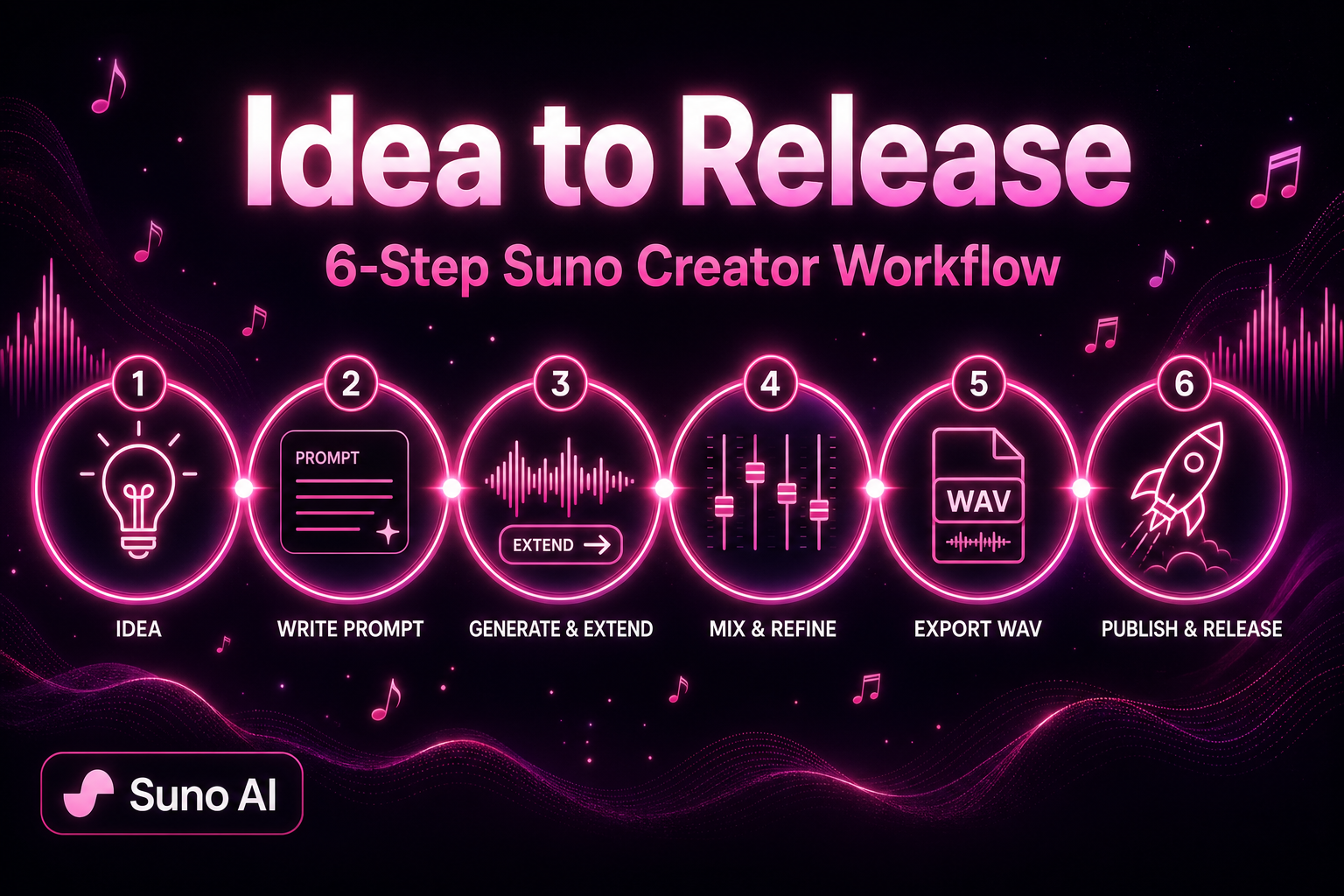
कई creators Suno को gacha की तरह treat करते हैं: एक लाइन, अच्छा clip, फिर रुकावट। YouTube, podcasts, indie games या music platforms पर वास्तव में ship होने वाला Suno AI संगीत repeatable workflow से आता है — luck से नहीं।
यह लेख Suno V5.5 के साथ releasable songs finish करने का छह-चरण प्रक्रिया साझा करता है। Short-form creator, podcaster या indie musician — Suno को toy से production line बनाएं।
वर्कफ़्लो क्यों, one-click miracle नहीं
Simple Mode ideas के लिए अच्छा है, लेकिन publishable काम को आमतौर पर चाहिए:
- पूरी structure: intro, verse, chorus, bridge, outro — default gens अक्सर एक loop
- Consistent identity: series content को recognizable sound चाहिए, हर track पर नया producer नहीं
- Controllable mix: level, EQ, vocal placement — raw exports नहीं
- Platform readiness: duration, loudness, metadata channel के अनुसार अलग
छह चरण एक बार चलाएं, फिर templatize करें।
चरण 1: Idea lock करें और Suno prompt draft करें
Suno खोलने से पहले पाँच मिनट:
- Use case: BGM, vocal single, intro/outro, game loop?
- Mood + BPM band: sad 70–85, energetic 120–140, ambient 90–110
- Vocal plan: instrumental, AI vocal, या Suno Voice Clone?
Custom Mode Style formula
[genre], [subgenre], [mood], [main instruments], [vocal type], [BPM], [production texture]उदाहरण (Mandarin pop ballad):
mandarin pop ballad, melancholic, piano and strings, soft female vocal, 78 BPM, intimate room productionटिप: Genre और mood Style की पहली लाइन पर — Suno early tokens heavily weight करता है। «nice» की जगह concrete instruments और tags (tape warmth, live drums, subtle reverb)।
My Taste enable करें; 6+ originals पर Custom Model train करें।
चरण 2: Custom Mode में «Extendable» first version generate करें
Suno AI संगीत जनरेटर खोलें, Custom Mode चुनें और भरें:
- Lyrics:
[Verse],[Chorus],[Bridge]से split; section में 2–4 lines - Style: चरण 1 की formula
- Title: library search के लिए
दो versions generate करें, clearest structure और catchiest chorus वाला seed master चुनें। लक्ष्य: stable 2–3 minute core — पहली बार perfection नहीं।
First-version checklist
| Check | Pass criteria |
|---|---|
| Chorus clarity | एक सुनाई में melody hum-able |
| Vocal articulation | Garbled Mandarin नहीं; English overly mushy नहीं |
| Arrangement density | Verses overcrowded नहीं; chorus lifts |
| Ending | Natural outro या clean Extend point |
Chorus OK, verses weak — timestamps Studio या second Extend के लिए।
चरण 3: Extend से full structure बनाएं
Suno V5.5 8 minutes तक, लेकिन segmented Extend अधिक reliable:
- Chosen version के अंत में Extend
- Style seed aligned (या mood words tweak)
- Extend window में
[Verse]/[Outro]add - ~30 s–2 min chunks में Extend; joins पर tempo jumps सुनें
Common 4-minute pop template:
Intro(Extend) → Verse(seed) → Chorus(seed) → Verse2(Extend) → Chorus → Bridge(Extend) → Final Chorus → Outro(Extend)Extend credits लेता है लेकिन full regens से बेहतर। Bad joins Suno Studio crossfades से fix।
चरण 4: Suno Studio में polish
Export से पहले Suno Studio (Premier fullest; Pro per plan):
- Stem balance: vocals bed से 1–2 dB ऊपर; chorus +0.5 dB
- EQ: vocals ~80 Hz नीचे high-pass; bed 8–12 kHz tame
- Section edits: 1–2 bad bars delete; adjacent copy patch
- Loudness: streaming ~-14 LUFS integrated (external meter)
Studio तब shine करता है जब small fixes full regen avoid। «AI sheen» heavy reverb और quantized drums से।
गहरा pass — हमारा Suno Studio पोस्ट-प्रोडक्शन ट्यूटोरियल.
चरण 5: Export और metadata
सही लगे तो export:
- WAV: archive master, mixing, distribution
- MP3 320 kbps: video edits, podcast embeds, quick previews
Search और platform forms के लिए metadata:
| Field | Suggestion |
|---|---|
| Title | Series numbering, e.g. «Night Walk Vol.3» |
| Style tags | Suno Style से 3–5 English keywords |
| Duration | Exact seconds — YouTube chapters |
| Production notes | Custom Model / Persona / Voice |
Monetization — Suno subscription terms पढ़ें; free tier usually personal-only।
चरण 6: Platform rhythm पर publish
Channels Suno output differently use करते हैं:
YouTube और short video
- Instrumental या low-vocal beds voice-over clear रखें
- Description में AI-assisted music disclose जहाँ required
- Series cohesion — one Custom Model या Style family
Podcasts
- Intros 15–30 s, outros 10–20 s — Extend variations
- -16 LUFS speech के नीचे -14 से often better
Indie games और apps
- Loop beds: seamless wrap check; Studio में downbeats align
- Two intensity layers (explore ambient vs combat upbeat) one harmonic plan
Music platforms (Spotify etc.)
- Artist name, artwork, ISRC distributor से; Suno export start है
- Voice Clone tracks — uploaded vocal rights
Advanced: Voice Clone + Custom Model + Personas
One-offs से signature sound:
- Voice Clone: 60–90 s dry vocal → AI singer timbre
- Custom Model: 6+ originals → arrangement habits
- Personas: Approved vocal profiles one-click reuse
Together track 20 still you। Voice: वॉइस क्लोन गाइड. Prompts: Suno prompt प्लेबुक.
तीन common pitfalls
1. One 8-minute prompt
Mega-gens पर control drops। Extend segments में approve each।
2. हर song radically different Style
Series identity खोती है। BPM bands + Custom Models fix।
3. Loudness check बिना upload
Too hot → limiting; too quiet → weak। Meter before upload।
Pre-release checklist
- Memorable chorus, complete structure
- Extend joins without obvious tempo jumps
- Studio में comfortable vocal/instrument balance
- Export format platform needs match
- Commercial use subscription terms verified
- Metadata और series naming consistent
संपादकीय अपडेट — 2026-08-08
इस पृष्ठ की Suno.ing Editorial द्वारा 2026-08-08 को पुनः समीक्षा की गई। इस दौर में हमने:
- हाथों-हाथ Experience अनुभाग की पुष्टि या जोड़ (pass/fail नोट्स)
- उत्पाद मेट्रिक (गाने की लंबाई की सीमा, similarity %) को संपादकीय अवलोकन माना — ऐप में और suno.com पर सत्यापित करें
- क्लाइंट और प्रकाशन उपयोग के लिए व्यावसायिक शर्तें / प्रकटीकरण कॉलआउट की पुनः जाँच
frontmatter में updatedDate इस संपादकीय दौर को दर्शाता है, न कि बिना पुनः पढ़े बल्क टाइमस्टैम्प।
हमने क्या परखा (व्यावहारिक नोट्स)
Suno V5.5 पर (संपादकीय पास, 2026-08), हमने इस publish workflow को तीन mock tracks (pop / instrumental bed / short sting) पर end-to-end चलाया। Suno.ing Editorial की नोट्स।
Pass / fail लॉग
| ट्रायल | फोकस | परिणाम | रखें / ठीक करें |
|---|---|---|---|
| A | Extend से पहले Custom Mode core | Pass — joins cleaner | हमेशा core first lock |
| B | Core stable होने से पहले Extend ×3 | Fail — collage joins | One section per Extend; audition |
| C | Publish बिना filename/versioning | Fail — «good» take खो गया | Title + date + vN scheme |
| D | Awkward bars का Studio trim | Pass | export से पहले required |
| E | Platform loudness skip | Fail — YouTube quiet लगा | Meter per destination |
पहली गलतियाँ जो हमने कीं
- Generate को finish line मानना — publish quality Extend + Studio + metadata में है।
- Archive naming नहीं — एक दिन में remix chaos।
- सभी platforms के लिए एक export — loudness/format per channel चाहिए।
हमारा रखा गया रेसिपी
Brief → Custom Mode 2 takes → Extend plan → Studio → WAV archive + platform MP3 → checklist। सुधार: Contact।
Related guides
सार: Suno को system, lottery नहीं
Suno AI music generator iterative work पर shine: seed → Extend → Studio → ship। छह steps template — weekly release।
खोलें Suno पर बनाना शुरू करें — Custom Mode seed master, फिर Extend पहला finished publishable single।